Overview:
-
Informs eligible users when you are currently online or recently active on Instagram.
-
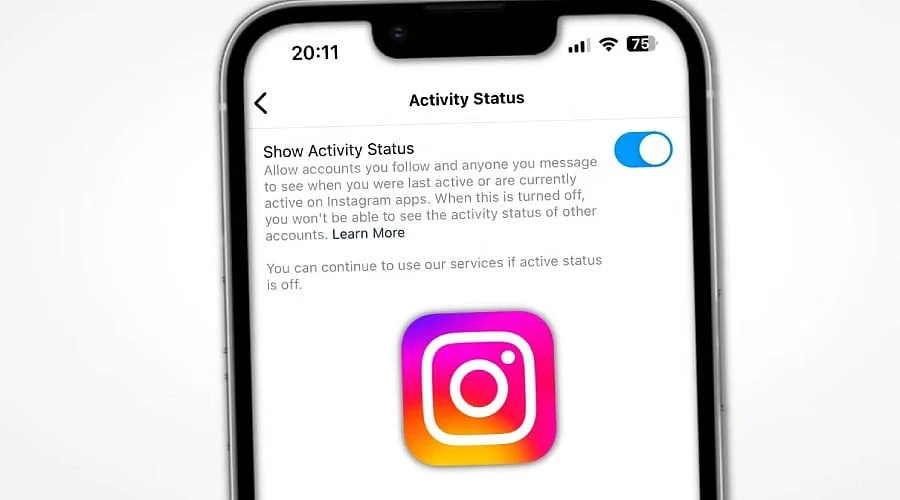
Find Show Activity Status located under Messages and story replies within Instagram settings.
-
Others will be unable to see your Activity Status, and you generally cannot view theirs either.
The Activity Status feature on Instagram reveals to other users when you are currently active on the platform or when you were recently online. This indicator usually appears near Direct Messages, displaying a green activity dot, an ‘Active now’ label, or a recent activity timestamp. Individuals who prefer not to share this data can disable Activity Status via the app’s settings. This option is available in both the mobile application and the web version of Instagram, though menu titles can shift following updates.
What is Instagram Activity Status?
Instagram’s Activity Status is a visibility preference tied to its direct messaging system. When activated, accounts you follow or have messaged—along with other eligible users—can see whether you are online or the last time you were active. This details often shows up in Direct Messages next to your account name or profile photo.
Disabling this feature stops Instagram from sharing your Activity Status with other eligible members. It does not, however, hide every single action you take on your account.
How to Turn Off Activity Status on Instagram
The instructions below apply to current versions of the Instagram app for iPhone and Android. The layout may differ slightly based on your operating system, app version, or account type.
-
Launch Instagram and tap your profile photo located in the bottom-right corner.
-
Tap the three-line menu situated in the top-right corner.
-
Select Settings and activity (certain accounts or versions might use alternate wording).
-
Scroll down to the section titled How others can interact with you and tap Messages and story replies.
-
Choose Show activity status.
-
Switch off the Show Activity Status toggle.
Instagram automatically saves changes made within the setting, so a separate save button is usually unnecessary. Interface guides from 2026 continue to place the Activity Status option under the Messages and story replies menu.
How to Turn Off Activity Status on Instagram Web
Users can also manage their Activity Status using the desktop website.
-
Log into Instagram via a web browser.
-
Click on More found in the bottom-left corner.
-
Choose Settings.
-
Open Messages and story replies.
-
Click on Show activity status.
-
Toggle off the Activity Status control.
Because Instagram updates its web platform frequently, layouts and labels can change over time. Recent instructions confirm that the setting remains accessible on desktop browsers.
Also Read: Instagram Music Guide: How to Add and Edit Music in Posts
What Happens When You Turn Off Activity Status?
Once disabled, other eligible individuals can no longer view your current or recent Activity Status. This removes badges such as “Active now” and timestamps showing your last visit.
This control operates reciprocally. Hiding your own activity means Instagram similarly restricts you from viewing other users’ activity statuses, meaning you typically lose sight of active indicators for other profiles.
Nevertheless, turning off this feature does not render your profile entirely hidden. Standard activities like commenting, posting, interacting with Stories, and other engagements are governed by distinct privacy settings.
Does Turning Off Activity Status Affect Instagram Messages?
No. Disabling this setting does not block you from sending or receiving Instagram Direct Messages, allowing you to chat without interruption.
Activity Status should also not be confused with read receipts. While Activity Status shows when you are online, read receipts reveal when a message has been opened. Because Instagram handles these as separate controls, switching off Activity Status does not automatically disable “Seen” markers.
Why Activity Status May Still Appear
If online details still show after you adjust the setting, ensure you updated the correct profile, especially if multiple accounts are logged into the same device. App updates, brief system delays, and different account types can also influence how options display.
If the Activity Status option seems missing, try updating the application or using the search bar within the settings menu. Menu labels are subject to change during platform updates.
How to Manage Other Instagram Privacy Settings
Activity Status represents only one facet of Instagram’s overall privacy tools. Members can also adjust message controls, read receipts, and profile privacy preferences. Because these features manage different elements of messaging and visibility, tweaking your Activity Status will not completely restrict all interaction indicators on its own.
Disabling your Instagram Activity Status takes just a few steps: open your profile, navigate to Settings and activity, select Messages and story replies, tap Show activity status, and turn the toggle off. This action conceals your status from eligible users while blocking you from viewing theirs. Future platform updates may alter these menus.
Also Read: WhatsApp Update: Users Can Access Instagram, Facebook Media Without Downloading
FAQs
1. Does turning off Instagram Activity Status hide my online status?
Yes. Disabling this feature stops eligible accounts from seeing your current or recent online presence via Activity Status, though it does not hide all types of engagement.
2. Does turning off Activity Status disable Instagram messages?
No. You can keep sending, getting, and reading Direct Messages as usual, as Activity Status functions independently from messaging capabilities.
3. Is Activity Status the same as Instagram read receipts?
No. Activity Status reflects whether you are currently or recently online, whereas read receipts show when a specific message is opened. They are separate settings.
4. Why can’t I find Show Activity Status on Instagram?
Instagram regularly alters its interface layout. Be sure to check under Messages and story replies, run any available app updates, or use the settings search tool if it is available.
5. Can I turn Activity Status back on later?
Yes. Simply navigate back to the Show Activity Status menu and re-enable the toggle to resume sharing your online visibility.