Overview
-
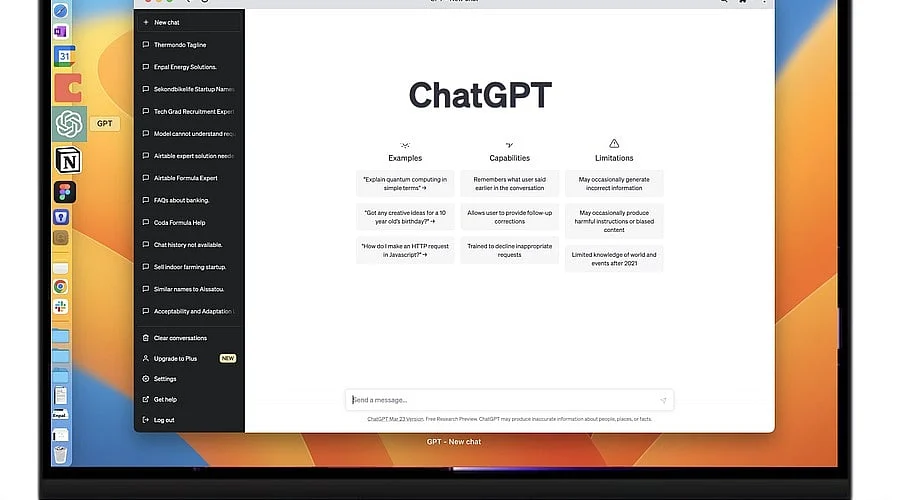
Operating in its own window on Mac and Windows machines, the ChatGPT desktop app provides a quick-launch shortcut, file uploads, screenshot sharing, and voice mode.
-
Although both the web version and the desktop application utilize identical accounts and models, their utility differs: the desktop application excels at rapid, short tasks, while the web browser platform provides superior organizational tools.
-
The application functions online rather than offline and omits certain web-exclusive features; furthermore, businesses ought to review data governance policies before deploying it organization-wide.
Daily artificial intelligence users have increasingly embraced the ChatGPT desktop application because it operates within a dedicated window, eliminating the need to open a separate browser tab for individual queries.
Because both formats utilize the same underlying models and accounts, the primary distinction lies in how each integrates into everyday workflows. This guide outlines the desktop application’s primary functions, ideal use cases, and how it measures up against the browser-based platform.
What the ChatGPT Desktop App Offers
Designed for Windows 10 and 11, the application followed an initial Mac release by OpenAI. While the Windows version initially rolled out exclusively to Plus subscribers, it is now accessible to free users as well. It does not operate offline.
Functioning as an interface for OpenAI’s cloud infrastructure, the software requires an active internet connection. Additionally, standard home computers generally lack the hardware capability to execute a large language model locally.
Key Features That Save Time
The primary standout element is the rapid launch shortcut. Mac users can trigger a chat window next to any active application by pressing Option and Space simultaneously, allowing them to type, speak, browse past chat logs, or upload documents and images.
Users can also capture either an entire screen or a single window and transmit the image directly to ChatGPT. For example, a software developer can snap a segment of code to request optimization suggestions. Desktop voice mode is also fully supported.
Best Uses in Daily Work
Industry analysts indicate that the software benefits individuals who constantly toggle between a browser, Excel, VS Code, and Slack. Minimizing tabs and leveraging fast shortcuts eliminates minor operational delays that accumulate over the course of a week. For instance, a product designer working in Figma can capture a screenshot, insert it into ChatGPT, and request copy suggestions without switching out of the design environment.
Writers can rapidly refine a problematic sentence in an email message, while students can quickly verify a concept prior to a lecture. Short, frequent interactions yield the greatest efficiency gains from the desktop software.
ChatGPT Desktop App vs Web Version
Fundamental capabilities remain identical across both mediums. Long-text assistance, coding support, general conversation, and image analysis function uniformly, meaning the desktop tool does not inherently make the AI more intelligent. The difference emerges in user experience: the desktop client launches more swiftly and allows smooth transitions between software programs. Conversely, the web variant leverages browser architecture, incorporating bookmarks, tabs, extensions, and streamlined link sharing, alongside more robust organizational AI tools.
A review conducted in July 2026 noted that the revamped desktop interface omits Pins, Projects, and the Scheduled page, which remain exclusive to the web browser. Additionally, web platform users could export comprehensive research reports as PDF documents—a capability absent from the desktop version when it debuted in May 2025.
Limits and Points to Check
Certain constraints apply to the desktop software. Initial promises regarding a live screen feed and live webcam video were not finalized at the time of release. Additionally, corporate IT departments must carefully evaluate data security rules. Many organizations find browser management more straightforward due to pre-existing data loss prevention tools and single sign-on frameworks.
Experts suggest that OpenAI should provide more explicit guidance regarding local data restrictions for enterprises handling source code or legal contracts. Furthermore, users should acquire the software exclusively through official OpenAI distribution channels or the Microsoft Store.
Conclusion
The ChatGPT desktop application is well-suited for individuals who interact with AI frequently throughout the day and prioritize speed, streamlined shortcuts, and fast screenshot sharing. Meanwhile, the web platform remains the preferred choice for multi-device usage, extensive research projects, and long-term organization.
Given that both environments rely on identical models and accounts, user preference should be dictated by personal workflow habits rather than processing power. Many users will find optimal utility by combining the two: utilizing the application for rapid inquiries and the web interface for more intensive tasks.
FAQs
1. Is the ChatGPT desktop app free to use?
Yes, free tier accounts can access it. Although the Windows edition initially required a Plus subscription, it is now open to free users. Paid tiers continue to provide higher usage caps and supplementary features.
2. Does the ChatGPT desktop app work offline?
No. Operating as an interface for cloud servers managed by OpenAI, the application mandates internet connectivity. Furthermore, standard consumer hardware lacks the necessary computing power to run the model independently.
3. Which is better, the desktop app or the web version?
Choice depends entirely on the task at hand. The desktop software accommodates rapid questions, frequent window switching, and image captures. The web platform is better suited for multi-device workflows, research, and long-term project management.
4. Is the ChatGPT app available for both Windows and Mac?
Yes. After launching the macOS edition first, OpenAI released a Windows variant supporting Windows 10 and 11 via the Microsoft Store.
5. What does the web version offer that the desktop app does not?
Based on a July 2026 evaluation of the updated desktop software, the browser platform includes the Scheduled page, pinned chats, and Projects. It also equips users with browser-based utilities like extensions, bookmarks, and tabs. Because features update frequently, checking OpenAI’s official pages is recommended for the latest specifications.