Overview:
-
A missing device leaves social networks, banking portals, cloud storage, and email accounts signed in and vulnerable.
-
Cellular carriers, Apple, WhatsApp, and Google deploy varying security mechanisms for stolen or misplaced hardware.
-
SIM card protection, remote account log-outs, device wiping, IMEI blacklisting, and remote locking offer layered security.
Leaving a mobile phone behind leaves every profile open. Cloud photo libraries, social networks, banking apps, and email accounts remain active until the user actively terminates each connection. Prompt action minimizes what an unauthorized person can access. Most active sessions can be terminated from an alternate device within minutes.
This process requires three distinct steps. A screen lock secures the display. Signing out terminates an active account session. Wiping the hardware deletes all saved files. The ideal sequence varies depending on the specific service.
Secure the Master Accounts First
Manufacturer accounts and primary email inboxes function like master keys. Because password recovery links for nearly all secondary services route directly to these accounts, they must be addressed first. The table outlines the appropriate actions for each platform.
Android and iPhone Need Different Care
On Android, Find Hub Secure Device—sometimes called ‘Mark as lost’—secures the phone using its existing password, pattern, or PIN. According to Google, this action also signs the primary Google Account out of the handset and can clear associated Google Wallet cards. This command functions exclusively while the device remains connected to the internet. If the handset is offline, the user can still flag it as lost; the lock activates automatically once the device reconnects.
Apple notes that its sign-in portal requires no verification code, enabling users to take action even if their trusted hardware has been stolen. Stolen Device Protection mandates Face ID or Touch ID authentication before Lost Mode can be deactivated, preventing unauthorized individuals from bypassing it with a passcode alone. Users should avoid removing the device from Find My.
Removing it disables the activation lock, which could otherwise allow a third party to factory reset and resell the equipment. Owners covered by AppleCare+ Theft and Loss should keep the device registered until their claim receives official approval. If Find My was disabled prior to the incident, the Apple Account password must be updated immediately.
Keep the Number, Lock the SIM
Your mobile number serves as a critical recovery token. Two-factor authentication codes, password resets, and notifications from financial institutions all rely on it. Because the SIM card forms part of the authentication chain rather than just the hardware, users should contact their telecommunications provider to lock the missing SIM and issue a replacement containing the identical number. Merely suspending the service without ordering a replacement disables the one-time passwords (OTPs) required to set up a replacement device.
A replacement SIM also facilitates the recovery of WhatsApp. Re-registering the phone number using the standard six-digit SMS confirmation code automatically terminates all active sessions on other hardware. WhatsApp specifies that it cannot manually deactivate an account upon request because it cannot verify user identity. Re-registering remains the standard recovery procedure.
Disable the Handset in India
The Sanchar Saathi portal operates the Central Equipment Identity Register (CEIR) network. It neutralizes a device by blacklisting its International Mobile Equipment Identity (IMEI) number, which appears on the original retail packaging and within the system settings. Submitting this request requires a formal police report, a duplicate SIM card to receive OTP verification, and approved identification documentation.
Once processed, the hardware ceases to function across all Indian cellular networks. IMEI blacklisting operates independently of remote data wiping procedures; users must still execute account sign-outs and remote erasures separately. A recovered phone can be restored only through a formal request initiated by filing a report with local law enforcement.
Close Banking, Social, and Work Sessions
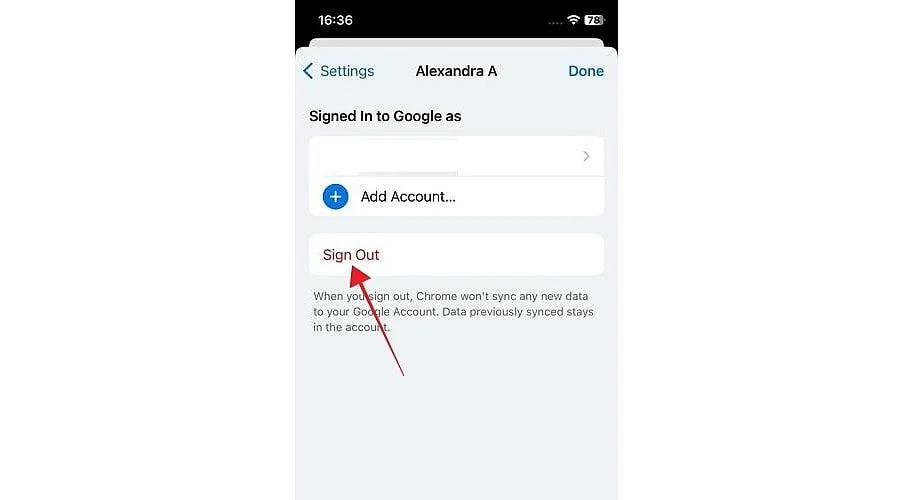
Every online service maintains an independent registry of active logins. Using a computer, users should navigate to the security settings of every professional, social, financial, and payment platform to execute a global log-out command that terminates all remote connections.
Changing passwords should follow immediately. One major financial technology provider notes that this sequence prompts an immediate credential challenge and locks connected debit or credit cards. Financial institutions should also be notified directly to deactivate mobile banking and UPI access associated with the missing number. Users should likewise audit saved payment cards stored within e-commerce applications.
Also Read: How to Sign Out of Netflix on Smart TVs, Apple TV, and More
Mistakes That Cost Owners Most
Executing a remote data wipe prematurely represents the most common error. While a factory reset offers the highest level of data privacy, it permanently terminates location tracking. Users should lock the device first, monitor its location briefly, and trigger a wipe only if recovery appears improbable. The second error is confusing a device lock with a complete account log-out.
A screen lock merely prevents a stranger from viewing the display, whereas logging out severs the connection to the remote server. Updating passwords finalizes the security overhaul. Retaining the original product packaging or purchase invoice significantly accelerates both police reporting and CEIR blacklisting procedures. The most secure recovery workflow prioritizes master accounts first, followed by the SIM card, individual application sessions, and finally the hardware itself, with remote data erasure performed last.
Also Read: How to Remove a Phone Number From Your Google Account?
Final Thought
Adequate preparation determines the outcome of any future device loss. Activating Find Hub or Find My in advance and recording the IMEI number in a secure location transforms a crisis into a straightforward checklist. As mobile operating systems continue to introduce advanced remote security controls, users who enable these features proactively will be best positioned to utilize them.
You May Also Like:
How to Sign in to Gmail Account?
How to Sign in to a Microsoft Account
Lost Your Phone? Here’s How to Avoid a 2-Factor-Authentication Disaster!
FAQs
1. What is the first step after losing a phone?
Secure your primary email accounts and device manufacturer profiles, as password recovery links for secondary services are sent to these addresses. On Android devices, access Find Hub via any web browser. On Apple hardware, select Mark as Lost by visiting iCloud.com/find.
2. What is the difference between locking, signing out, and erasing?
A screen lock restricts visual access to the interface. Signing out terminates an active server session. Wiping removes all locally saved user data. Because each step addresses a unique security risk, users should execute all three in the proper sequence.
3. Should the SIM be deactivated or replaced?
Users should request that their mobile carrier lock the compromised SIM and issue a replacement card with the same phone number. Suspending service without ordering a replacement blocks the one-time verification codes required to access accounts on a new device.
4. How can WhatsApp be signed out of a lost phone?
Register your phone number on replacement hardware using the standard six-digit SMS confirmation code, which automatically signs out all other linked devices. WhatsApp cannot process manual deactivation requests because it lacks a mechanism to verify user ownership.
5. What does the CEIR system do in India?
Managed through the Sanchar Saathi portal, the CEIR system blocks a handset from operating by targeting its IMEI number. Submitting this application requires a police report, a duplicate SIM card, and official identification. This process does not substitute for remote account sign-outs or device wipes.