Overview:
-
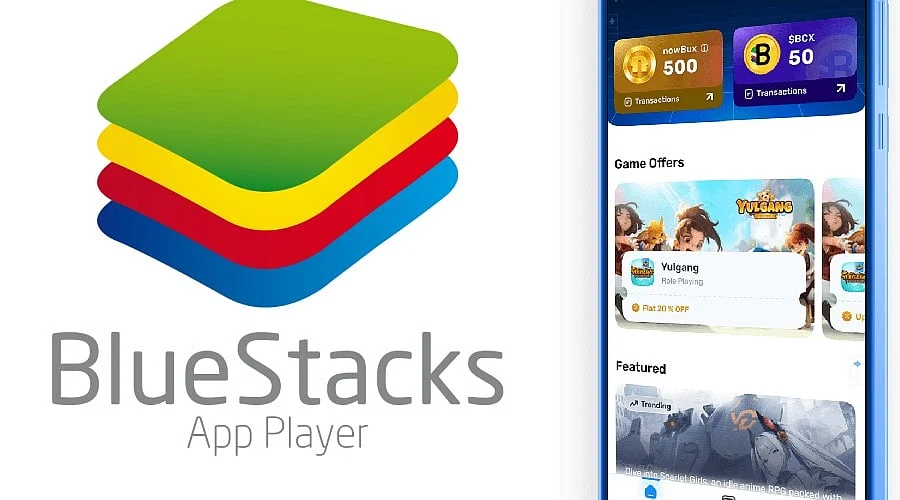
Android Emulation on Desktop: BlueStacks sets up a virtual Android system right on your computer, allowing you to run mobile applications and games without needing a physical phone.
-
Tailored for Gaming: It is well-equipped for mobile gaming thanks to mouse and keyboard support, adjustable key mapping, high frame rate capabilities, and multi-instance functionality.
-
Free of Charge: The base software is completely free to download and utilize, funded by in-app promotions along with optional premium features.
BlueStacks functions as an Android emulator enabling individuals to operate mobile software and games on Windows and Mac machines. It delivers a complete Android ecosystem featuring Google Play Store integration, adaptable mouse and keyboard controls, and utilities for managing multiple application instances simultaneously. Gamers, software testers, and everyday users rely on it to experience mobile media on a larger screen alongside enhanced input methods.
Download BlueStacks
You can acquire BlueStacks directly through its official website at https://www.bluestacks.com. The initial installer is lightweight and downloads necessary components during the installation procedure. Always stick to the official source to steer clear of altered packages and bundled junk software.
Here are the primary emulator and desktop-based Android solutions available for running mobile programs on a PC:
-
BlueStacks: https://www.bluestacks.com
-
LDPlayer: https://www.ldplayer.net
-
MEmu Play: https://www.memuplay.com
-
GameLoop: https://www.gameloop.com
-
Android Studio Emulator: https://developer.android.com/studio
Quick Information
-
Developer: BlueStacks (now.gg, Inc.)
-
Category: Android Emulator / Mobile Gaming
-
License: Free (ad-supported, with optional paid features)
-
Platforms: Windows, macOS
-
Version: BlueStacks 5 (check the official site for the latest build)
-
File Size: The setup file is at most a few hundred megabytes; installed storage depends on the Android instance and apps used (allocate at least 5 GB)
About BlueStacks
Established in 2009, BlueStacks grew into one of the most prominent Android emulators available. It was created to bridge the divide between mobile devices and personal computers, letting people execute Android apps on a PC without requiring a phone or tablet. Over time, it evolved from a basic app player into a dedicated gaming platform by introducing customizable controls, macros, an eco mode for reduced resource consumption, and multi-instance support. Its user interface features an integrated app center alongside Google Play access, enabling you to install programs just as you would on a mobile device. Common use cases involve playing mobile titles using precise controls, testing software, and accessing mobile-exclusive platforms on a desktop.
Is BlueStacks Free?
Yes, downloading and using BlueStacks costs nothing. The platform sustains itself through advertisements inside its app center and may present optional paid upgrades or subscription plans. Any games or applications you acquire through Google Play retain their standard pricing and microtransaction structures.
BlueStacks Compatibility / System Requirements
Minimum:
-
OS: Windows 7 or newer (Windows 10 or 11 advised); Mac support is provided via a dedicated release
-
Processor: Intel or AMD CPU
-
RAM: 4 GB
-
Storage: 5 GB of available hard drive space
-
Graphics: Current graphics drivers
-
Other: PC administrator privileges; enabled hardware virtualization (VT-x/AMD-V) for optimal execution
Recommended:
-
Processor: Multi-core Intel or AMD CPU with virtualization turned on
-
RAM: 8 GB or greater
-
Storage: Solid-state drive (SSD) with ample free space
-
Graphics: Dedicated GPU with up-to-date drivers
System prerequisites and compatible Mac hardware can shift across updates, so verify the most current specifications on the official portal.
How to Use BlueStacks
-
Get the setup utility from the official BlueStacks web page.
-
Execute the installer and adhere to the on-screen prompts to finish the setup.
-
Open BlueStacks and log in using your Google credentials to gain entry to the Google Play Store.
-
Look up and install your preferred Android game or software.
-
Rely on the standard key assignments or tailor the layout using the built-in Game Controls editor.
-
Modify performance parameters (such as CPU cores, memory allocation, screen resolution, and refresh rate) to suit your computer hardware.
Pros and Cons of BlueStacks
Pros:
-
Zero cost for downloading and operation
-
Robust keyboard, mouse, and gamepad compatibility featuring adjustable key binds
-
Multi-instance capability for running multiple applications or user profiles simultaneously
-
Modifiable performance controls and eco mode
-
Straightforward installation coupled with Google Play connectivity
Cons:
-
Can consume substantial CPU, memory, and storage resources
-
Displays promotions and commercials within the platform interface
-
Certain games restrict or outright ban emulator usage
-
Performance relies heavily on host hardware and virtualization configurations
Best Alternatives to BlueStacks
-
LDPlayer
-
MEmu Play
-
GameLoop
-
NoxPlayer
-
Android Studio Emulator
BlueStacks Specifications
-
Type: Android emulator
-
Android Versions: Supports multiple Android environments (depends on the build)
-
Key Features: Key mapping, multi-instance, macros, eco mode, high FPS support
-
Release Year: 2011 (initial public debut); BlueStacks 5 launched in 2021
-
Publisher: BlueStacks / now.gg, Inc.
-
Modes: Single and multi-instance
Frequently Asked Questions
1. What is BlueStacks used for?
BlueStacks runs Android applications and games on Windows and macOS computers, offering a larger screen alongside mouse and keyboard input options.
2. Is BlueStacks free to download?
Yes, downloading and using it is entirely free, though it includes advertisements and optional paid services.
3. Is BlueStacks safe?
It is generally viewed as secure when acquired from the official website. Stay away from third-party portals that might distribute altered installers or bundled adware.
4. What are the system requirements for BlueStacks?
At a minimum, you require Windows 7 or newer, an Intel or AMD processor, 4 GB of RAM, and 5 GB of open storage. Additional memory and enabled virtualization enhance overall speed.
5. Can I run multiple games at once on BlueStacks?
Yes, the multi-instance capability enables you to run various apps or profiles concurrently, though this demands higher system performance.