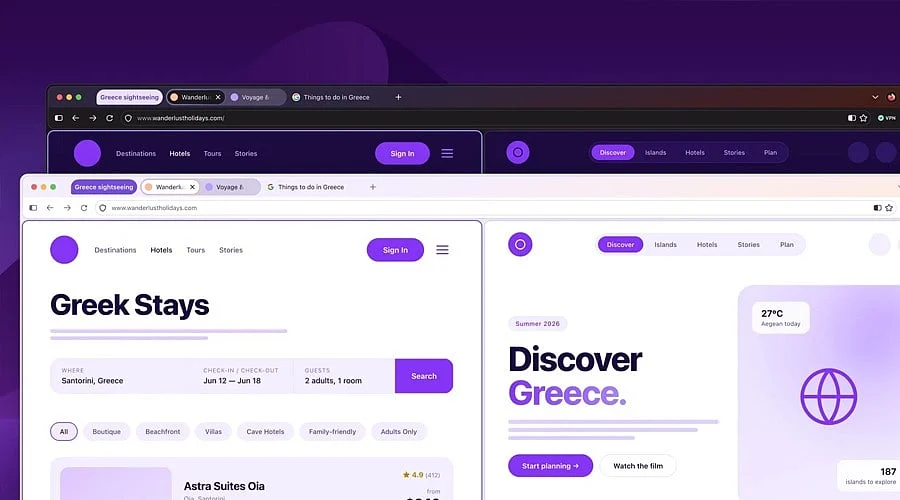
Mozilla is preparing a significant visual refresh for Firefox with version 157, introducing softer geometry, curved tabs, and uniform styling for both desktop and mobile platforms. This update forms part of Mozilla’s wider initiative to modernize the browser while preserving its fundamental identity.
The updated interface incorporates curved elements across all areas, spanning the address bar and tabs. Alongside redesigned icons, spacing, and color schemes, these changes deliver a cohesive look throughout the entire browser environment.
Mozilla characterizes this visual update as a modernization effort rather than a total replacement of Firefox’s current layout, emphasizing that these modifications aim to update the browser without impacting performance.
More Themes and Personalization
Additional customization options arrive with Firefox 157. Mozilla has introduced fresh themes and wallpaper selections, featuring an updated color palette that provides distinct aesthetics tailored for both light and dark mode preferences.
Beyond visual changes, Mozilla has focused on improving the accessibility of frequently utilized tools, such as vertical tabs, Split View, and tab groups.
The company notes that accessibility served as a key consideration during the redesign process, influencing text readability, color contrast, focus indicators, keyboard navigation, and integration with various system preferences.
Compact Mode Makes a Return
A standout feature for long-time Firefox users is the comeback of Compact Mode, which has been restored in response to community feedback. This setting decreases the vertical space occupied by toolbars, tabs, and browser controls to maximize viewing area for web content.
Official support documentation from Mozilla indicates that users can now activate Compact Mode straight from the Settings menu in Firefox 157, eliminating the need for previous workarounds. This setting proves especially advantageous for compact screens or users who favor a streamlined interface.
Also Read: Firefox iOS Gets Native Ad Blocking: What it Means for Users
Firefox Continues its Broader Refresh
This aesthetic overhaul arrives on the heels of several updates rolled out over the past year, which included homepage enhancements, built-in VPN capabilities, Split View, and settings to manage or turn off integrated AI tools.
As competitors increasingly integrate artificial intelligence, Mozilla has similarly experimented with AI browser capabilities like Smart Window, while maintaining user controls that let individuals choose whether or not to activate these enhancements.
Consequently, Firefox 157 delivers more than just aesthetic updates. The release combines a refreshed design language, expanded customization choices, and the revival of a heavily requested compact interface, all while maintaining the browser’s longstanding commitment to user control.