Overview:
-
Apple HomeView supports selected iPhone apps through a CarPlay-inspired compatibility system.
-
Users can manage lighting, locks, temperatures, automations, and nine security camera feeds.
-
Siri AI, personalized experiences, and privacy protections strengthen Apple’s connected home ecosystem.
Apple is advancing toward a connected home ecosystem with the introduction of HomeView, a smart home display engineered to consolidate device controls, personal data, and curated apps into a single hub. However, the device distinguishes itself from traditional smart displays through its unique handling of third-party applications.
Rather than featuring a dedicated App Store, HomeView relies on compatible apps hosted on a paired iPhone or iPad, mirroring the operational model of Apple CarPlay. This methodology allows the technology giant to broaden HomeView’s capabilities without developing an entirely standalone app ecosystem, further reinforcing its objective to link devices and services through a unified software experience.
Apple HomeView Comes with 15 Built-In Apps
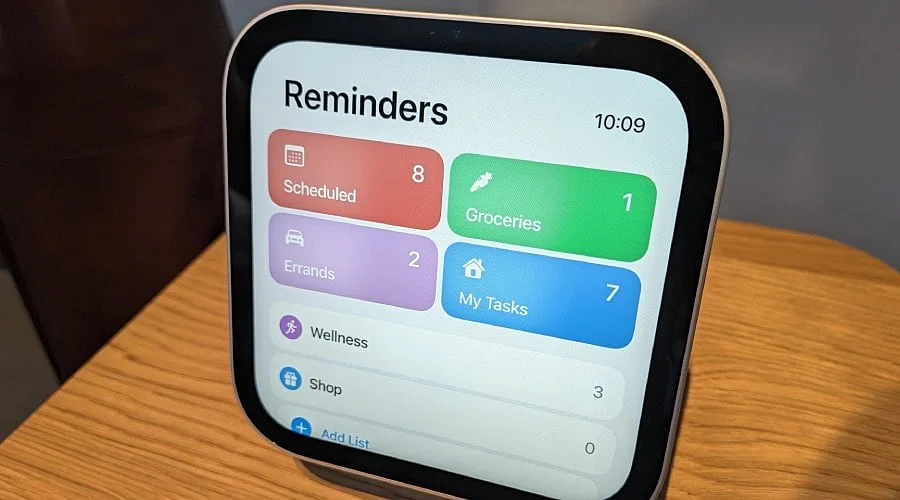
HomeView features 15 pre-installed Apple applications designed to handle communication, entertainment, and everyday organization. The built-in suite includes Calendar, FaceTime, Find My, Home, Intercom, Messages, Music, Podcasts, Reminders, Safari, Settings, Weather, Alarms, Timers, and World Clock.
Because the gadget lacks a native App Store, users cannot directly download and install new applications onto the display. Instead, the company permits third-party audio and video programs to project onto HomeView directly from a connected iPhone.
Supported programs encompass services like Apple Music Classical, Apple News, Apple TV, and Audiobooks, alongside compatible third-party platforms such as Spotify, contingent upon their compatibility with Apple’s framework.
This architecture grants individuals access to targeted services without forcing developers to build custom applications specifically for HomeView.
Also Read: Apple HomeView Review: Features, Design, and First Impressions
How Apple CarPlay Fits into Picture
Apple’s strategy borrows heavily from the CarPlay framework, which projects compatible iPhone apps onto a vehicle’s infotainment screen. This setup enables consumers to utilize supported services via an external display rather than depending strictly on the phone.
Official Apple developer documentation verifies that existing CarPlay audio and video apps function on HomeView without requiring developers to alter their code.
This integration simplifies the process for developers already supporting CarPlay to expand their reach onto Apple’s smart display. Instead of engineering a distinct application for every separate piece of hardware, creators can leverage existing compatibility parameters to reach audiences across the entire Apple network.
Even so, this does not mean every standard iPhone app will automatically translate to HomeView, as support remains restricted to qualified applications and features.
Smart Home Controls Remain at Center
Beyond its application mechanics, HomeView is built to act as the primary control center for all smart home hardware. Consumers can view feeds from HomeView security cameras, adjust lighting states, regulate indoor temperatures, operate door locks, and execute other automated tasks via the Apple Home application.
Additionally, HomeView accommodates up to nine simultaneous video streams, allowing residents to oversee multiple property zones from one panel. The system also delivers tailored experiences tailored to as many as six distinct household occupants.
According to Apple, the device’s A18 chip integrates Secure Enclaves that process microphone and camera data within an isolated environment, enabling user recognition without exposing sensitive information to the operating system or Apple itself.
These mechanisms ensure that privacy and user-specific functionality remain just as central to HomeView’s design as day-to-day utility.
Also Read: Why Did NVIDIA, Apple, Microsoft, and Meta Give Trump USD 92 Million?
What this Means for Apple’s Smart Home Plans
HomeView’s heavy reliance on iPhone apps underscores Apple’s overarching mission to foster an interconnected product ecosystem where all hardware works in tandem. The iPhone supplies personal data and software access, while the smart display functions as the household interface.
This approach also carries drawbacks. The omission of an independent App Store restricts how far the hardware can organically evolve its functionality. Ultimately, HomeView’s market value will rely heavily on developer participation and how seamlessly third-party tools integrate with the display.
Consumers deeply embedded in the Apple ecosystem will find this integration to be an efficient method for governing connected accessories, messaging, and media. Conversely, multi-platform households will encounter a more restricted experience.
Ultimately, HomeView’s success hinges on Apple’s ability to balance operational simplicity with flexibility through its CarPlay-derived app delivery model.
FAQs
1. What is Apple HomeView?
Apple HomeView is a smart home display that combines controls for connected devices, selected apps, communication features, and entertainment services.
2. Does Apple HomeView have its own App Store?
No, Apple HomeView does not have a dedicated App Store. It supports selected compatible applications from a paired iPhone or iPad.
3. How does Apple CarPlay relate to HomeView?
HomeView supports compatible CarPlay audio and video apps, letting developers extend existing services without modifying their apps.
4. What smart home features does Apple HomeView support?
Users can control lighting, temperature, door locks, and automations while viewing up to nine compatible security camera feeds at once.
5. How many people can Apple HomeView recognize?
Apple HomeView supports personalized experiences for up to six household members, tailoring supported features to individual users.