Overview
-
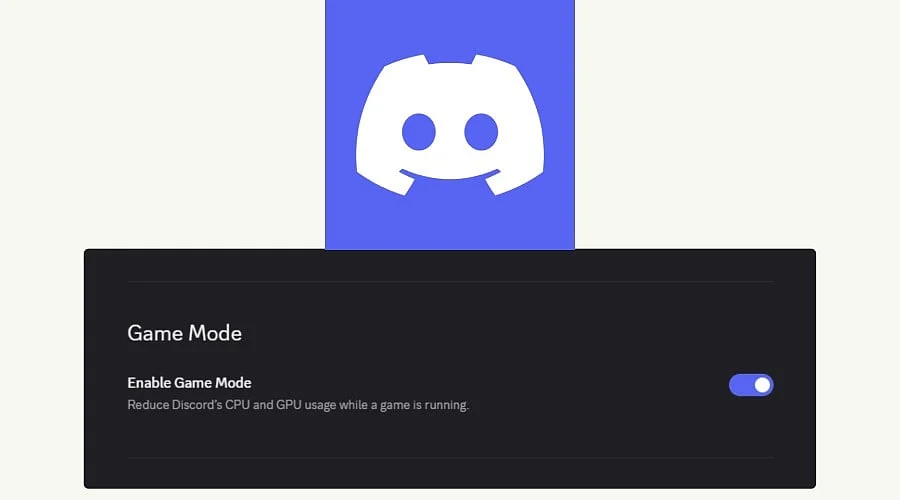
Discord Game Mode is an experimental feature built to scale back animations and visual effects while a user plays a game.
-
This setting is intended to minimize Discord’s CPU and GPU load without directly altering game performance.
-
Independent performance benchmarks are not yet available, and the actual benefits will depend on individual hardware, specific games, and concurrent background tasks.
Intensive titles can push a computer right up against its CPU and GPU boundaries. Meanwhile, Discord continues operating its interface, visual effects, animations, and background processes. Although the resource cost seems minor, computer gamers have raised complaints about it for years. Discord Game Mode represents the company’s latest attempt to address this issue.
What Is Confirmed About Discord Game Mode
Discord acknowledged the experiment on X on September 28, stating that the rollout would commence the following week. The company also noted that additional resource-saving capabilities would roll out over time. Specific insights regarding the switch surfaced via Discord Previews, which spotted the option inside the desktop software. Discord has not yet released a comprehensive catalog of the visual elements disabled by Game Mode.
How Game Mode Could Reduce CPU and GPU Use
The control functions by curbing Discord’s CPU and consumption of the GPU during active gameplay. The application reportedly senses when a game is running, subsequently dampening animations and shutting down certain visual effects. Normal operation resumes as soon as the game shuts down.
The underlying mechanism is fairly straightforward. The desktop application relies on Electron, which operates on top of Chromium. Moving elements demand constant redrawing, and each redraw consumes CPU and GPU cycles. This explanation reflects an analysis rather than an official statement from Discord. Additional context can be found in the platform’s patch notes, detailed below.
Discord CPU Usage: What the September Patch Notes Show
Game Mode arrives on the heels of other desktop performance updates. In the release notes for September 8, Discord reported that an upgrade to Electron 42, combined with modifications to how the program utilizes it, cut median (p50) CPU utilization by approximately 17%.
Conversely, median memory utilization grew by roughly 4%. A separate modification that eliminated redundant rendering shaved an estimated 3% off median CPU utilization. These metrics reflect overall desktop app performance. Discord did not specify whether these numbers were tracked while games were running, and no performance data has been released for Game Mode specifically.
How It Differs From Other Discord Performance Settings
Users already have access to manual settings within Discord. The Discord Reduced Motion option dampens animation intensity and hover transitions. Hardware acceleration dictates how the software leverages graphics hardware for internal rendering, and disabling it is often recommended if Discord appears to degrade game performance. Game Mode functions essentially as an automated variant of Reduced Motion that activates only during gameplay.
What Discord Game Mode Does Not Fix
Current reports on Game Mode make no mention of memory reductions. The function is characterized strictly as a CPU and GPU optimization tool, and no published data indicates that it decreases Discord’s RAM consumption. In fact, Discord’s own telemetry indicates that median memory usage went up following the Electron update.
Screen sharing presents another factor to monitor. Streaming at high resolutions or high frame rates demands heavy processing power, and it remains uncertain whether Game Mode alters that specific workload.
Who Is Likely to Benefit
Performance gains vary based on computer hardware, the game being played, and other active programs. Systems struggling with limited CPU or GPU headroom stand to gain the most, such as budget desktop builds and older laptops. Lowering Discord’s GPU utilization will have the greatest impact on integrated graphics configurations. High-end systems may see negligible differences.
Game Mode should be viewed as a resource-management tool rather than a direct frame-rate booster. Its objective is to shrink Discord’s background footprint so the game enjoys extra CPU and GPU breathing room.
Whether that extra headroom translates into higher frame rates, more consistent frame pacing, or zero perceptible difference depends entirely on the machine and the title. Smoother frame pacing is the most probable advantage, as background resource spikes from chat clients can induce micro-stutters. This remains an expectation, however, and only thorough testing can verify it.
Also Read: Discord Enables End-To-End Encrypted Calls For All Users Globally
How Players Can Test It
The new toggle might not appear on every account immediately. Users can open Windows Task Manager and monitor Discord’s CPU and GPU resource columns during a consistent gameplay segment, first with Game Mode disabled and then enabled. Running the test twice helps secure reliable data. Players seeking to minimize Discord stuttering while gaming can test the Reduced Motion feature right now, given that Game Mode appears built on that same concept.
What to Watch After Launch
Three main factors will determine the utility of the feature: precisely which visual effects it disables, whether it extends to screen sharing, and whether it becomes enabled by default or remains purely optional. Independent testing data is not yet accessible.
Also Read: Charles Hoskinson Plans Cardano Community Shift from X to Discord
Final Thought
Discord’s pledge to introduce further resource-saving utilities is ultimately more significant than this initial toggle. The upcoming test is whether subsequent updates apply this same strategy to heavier workloads. Should that happen, a standard chat program might finally act like a considerate guest sitting alongside a video game.
You May Also Like:
Crypto News Today: OpenClaw Discord Bans Asset Talk After Solana Token Scam Hit
Gamers Use Death Stranding to Bypass UK Age Verification on Reddit and Discord
Google Cloud Outage Hits U.S. Services Midday: Spotify, Discord, Replit Affected
FAQs
1. What is Discord Game Mode?
Discord Game Mode is an experimental toggle engineered to scale back animations and visual effects while a game runs.
2. Does Discord Game Mode reduce CPU usage?
Yes. The feature is built to lighten Discord’s CPU burden during gaming sessions, though Discord has not shared targeted benchmarks for Game Mode.
3. Does Discord Game Mode reduce GPU usage?
Yes. Game Mode focuses on cutting down GPU resource usage by disabling select animations and graphical effects during gameplay.
4. Does Discord Game Mode reduce RAM usage?
At present, no published evidence indicates that Game Mode decreases Discord’s RAM consumption. Its focus remains strictly on CPU and GPU resources.
5. Can Discord Game Mode increase FPS?
It is not built to function as a direct frame-rate booster. Trimming Discord’s resource footprint could free up CPU or GPU headroom, but actual results will vary depending on the system and game.